Importing Affialites
One of the methods to add affiliates into your dashboard is importing them from a CSV file.
Navigate to Affiliates → Management → Import Affilaites
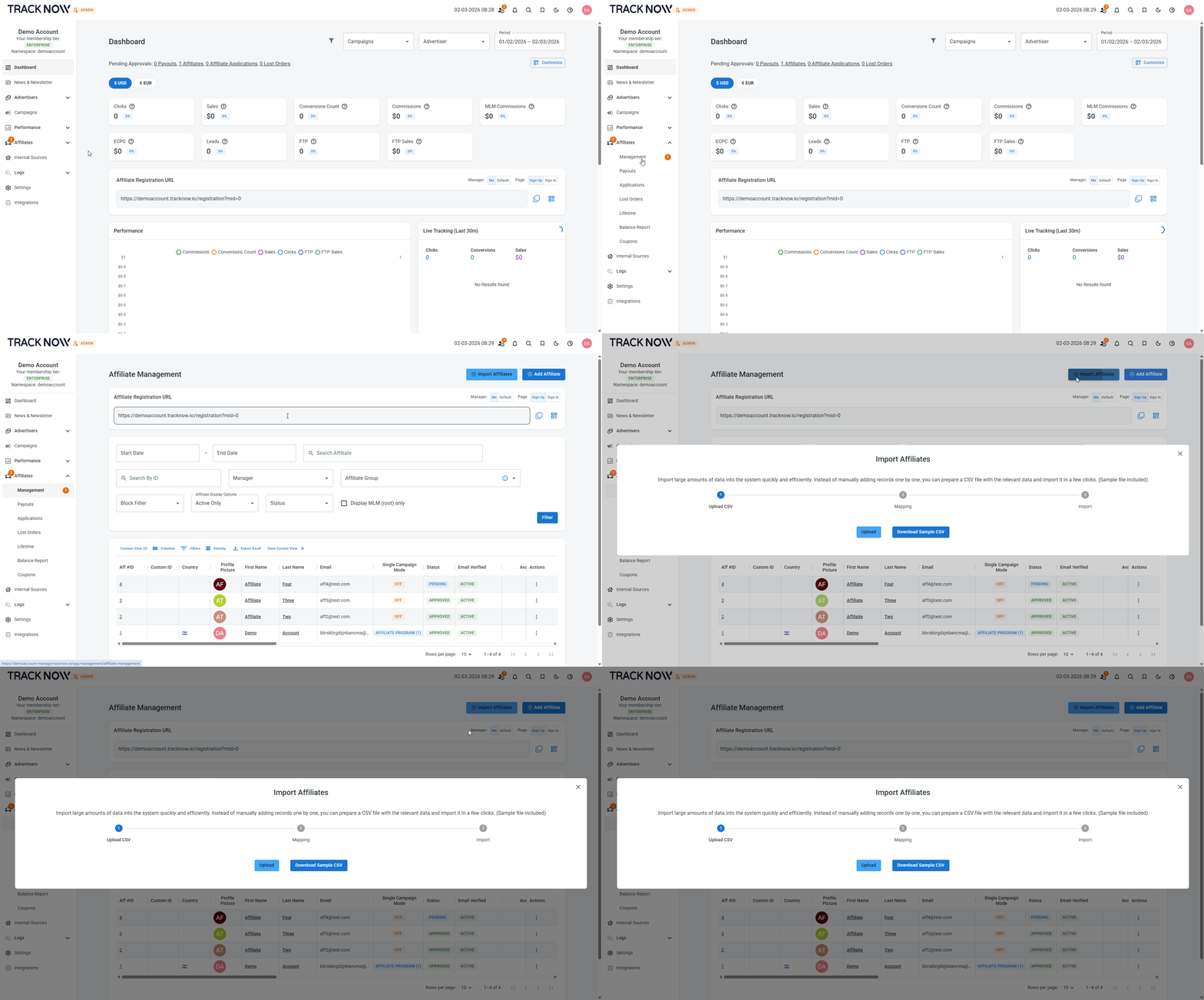
You can download a sample file that includes all of the fields you can fill out about each affiliate, edit it with your own values and import it to the system.
| Column | Description |
|---|---|
| Email (Mandatory) | Fill out the affiliate's email address |
| First Name (Mandatory) | Fill out the affiliate's first name |
| Last Name (Mandatory) | Fill out the affiliate's last name |
| Password (Optional) | Enter a password for the affiliate (they can later reset it) |
| Affiliate (Optional) | If the affiliate is a part of company, you can specify the affiliate's company name. Otherwise you can re-enter his name there. |
| Custom Id (Optional) | Add a custom ID associated with this affiliate (for example, an identifier from your previous affiliate software) |
| Custom Parent Ref Id (Optional) | If you are using MLM, you can specify the parent affiliate's Custom Id value to add the current affiliate under him in the MLM structure |
| Campaign Id (Optional) | If you know which campaign this affiliate will promote and you want to add him to that campaign during import, fill out the campaign ID |
| Payout Group Name (Optional) | If you already have a configured payout group to which you'll want to add this affiliate, specify the name of that group |