Tracking URL Passed Parameters
Each landing page you create in Tracknow automatically generates a unique tracking URL for every affiliate with access to that page.
Affiliates use this URL to promote the landing page by sharing it across their channels. When a user clicks the tracking link, they are redirected to the corresponding landing page.
By default, the tracking URL looks like this:
https://{YOUR NAMESPACE}-tracking.tracknow.info/click?campaign_id={VALUE}&ref_id={VALUE}
You can also setup a custom sub-domain so that tracking URLs will appear from your domain, for example:
https://example.yourdomain.com/click?campaign_id={VALUE}&ref_id={VALUE}
Default Parameters
Tracking URLs always include the following parameters:
campaign_id– identifies the Tracknow campaign associated with the landing pageref_id– identifies the specific affiliate link that was clicked
When a user clicks on the tracking URL, Tracknow generates a click record and stores these parameters on that click record.
Whenever a conversion postback is sent to our system indicating a specific click_id (a click record identifier), the conversion attribution is based on these parameters.
- The
campaign_idvalue will determine under which campaign this conversion will be added - The
ref_idvalue will determine which affialite will receive the commission for that conversion.
Click records can be seen on your Tracknow dashboard under Logs → Clicks
Additional Parameters
You can also append additional parameters to a tracking URL, which will be captured and stored with the click record.
When a conversion is later reported via postback using the corresponding click_id, it inherits all parameters associated with that click, including any custom values passed in the original tracking URL.
Navigate to Campaigns → Click on the name of the relevant campaign → Tracking Tools / Creatives → Landing Page section → Click the small arrow at the top right corner to reveal supported parameter keys
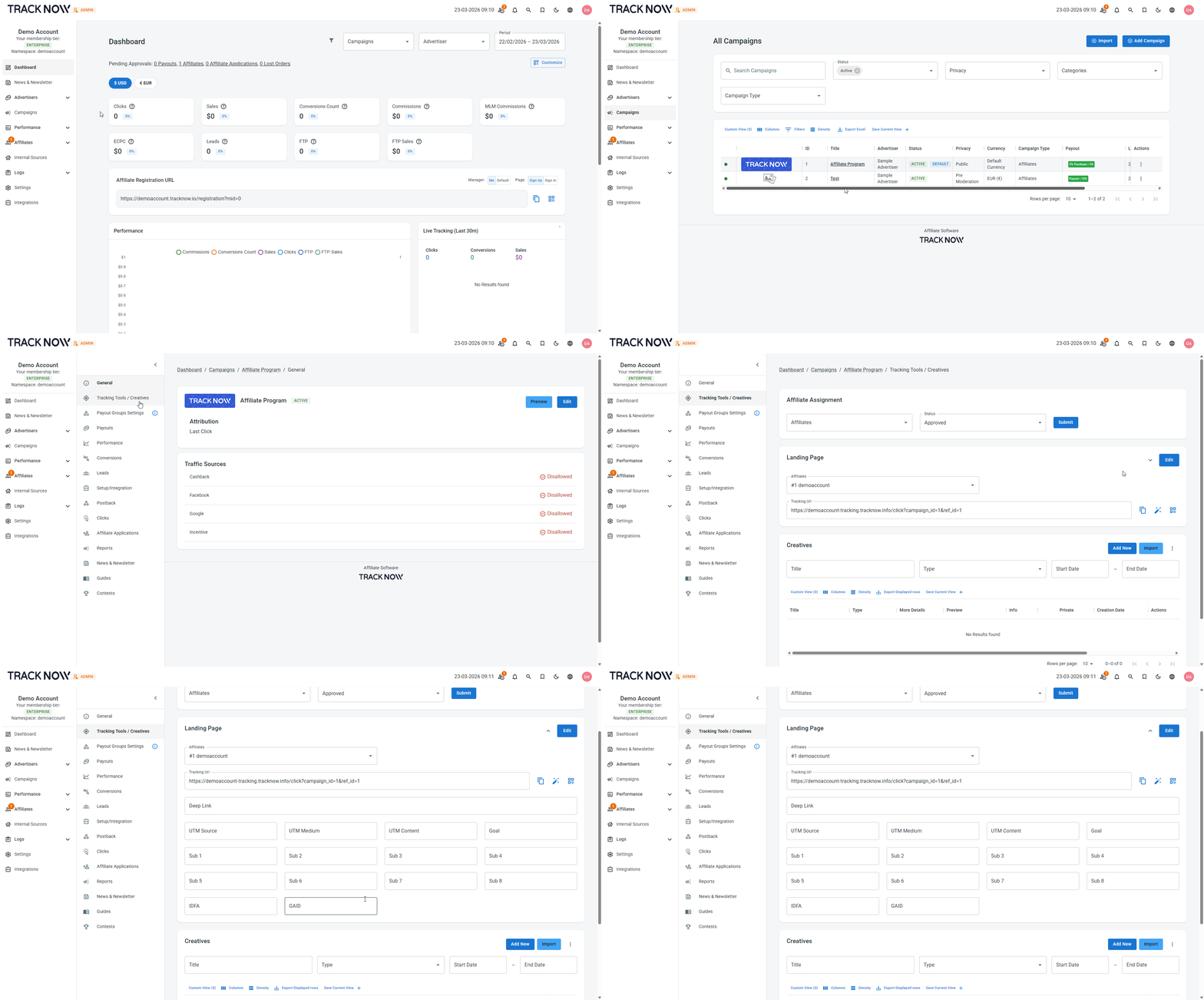
| Field | Parameter Key | Description |
|---|---|---|
| UTM Source | utm_source | Google Analytics dedicated parameter. Used to pass a UTM Source value |
| UTM Medium | utm_medium | Google Analytics dedicated parameter. Used to pass a UTM Medium value |
| UTM Content | utm_content | Google Analytics dedicated parameter. Used to pass a UTM Content value |
| Goal | goal | Allows you to pass a goal value that is stored with the click record. When a conversion postback is later received with the corresponding click_id, the system uses this stored goal value to trigger the payout configured for that specific goal. |
| Sub 1 | sub1 | A parameter for any text or values you want to pass that don’t have a dedicated parameter |
| Sub 2 | sub2 | A parameter for any text or values you want to pass that don’t have a dedicated parameter |
| Sub 3 | sub3 | A parameter for any text or values you want to pass that don’t have a dedicated parameter |
| Sub 4 | sub4 | A parameter for any text or values you want to pass that don’t have a dedicated parameter |
| Sub 5 | sub5 | A parameter for any text or values you want to pass that don’t have a dedicated parameter |
| Sub 6 | sub6 | A parameter for any text or values you want to pass that don’t have a dedicated parameter |
| Sub 7 | sub7 | A parameter for any text or values you want to pass that don’t have a dedicated parameter |
| Sub 8 | sub8 | A parameter for any text or values you want to pass that don’t have a dedicated parameter |
| IDFA | idfa | IDFA is a random device identifier assigned by Apple to a user’s iOS device |
| GAID | gaid | Google Analytics dedicated parameter. Used to pass a Google Advertising ID value |