WooCommerce Integration
Tracknow integrates with WooCommerce stores to automatically transmit data for completed purchases into your Tracknow dashboard. This enables accurate tracking and attribution of purchases made by customers referred by your affiliates.
Methods of Integration
There are two supported methods for integrating Tracknow with a WooCommerce store:
Tracknow Plugin
Tracknow provides a plugin that can be installed on a WooCommerce store to enable purchase tracking
Postback
Implement the required scripts and configure postbacks to enable purchase tracking
| Plugin | Postback |
|---|---|
| Simple installation process | More manual and technical implementation |
| A pre-configured set of purchase details are sent | Full control over which details are sent |
Prerequisites
Both integration methods require you to enable passing our unique affiliate identifier click_id to your landing page.
For instructions, click here.
Plugin Integration
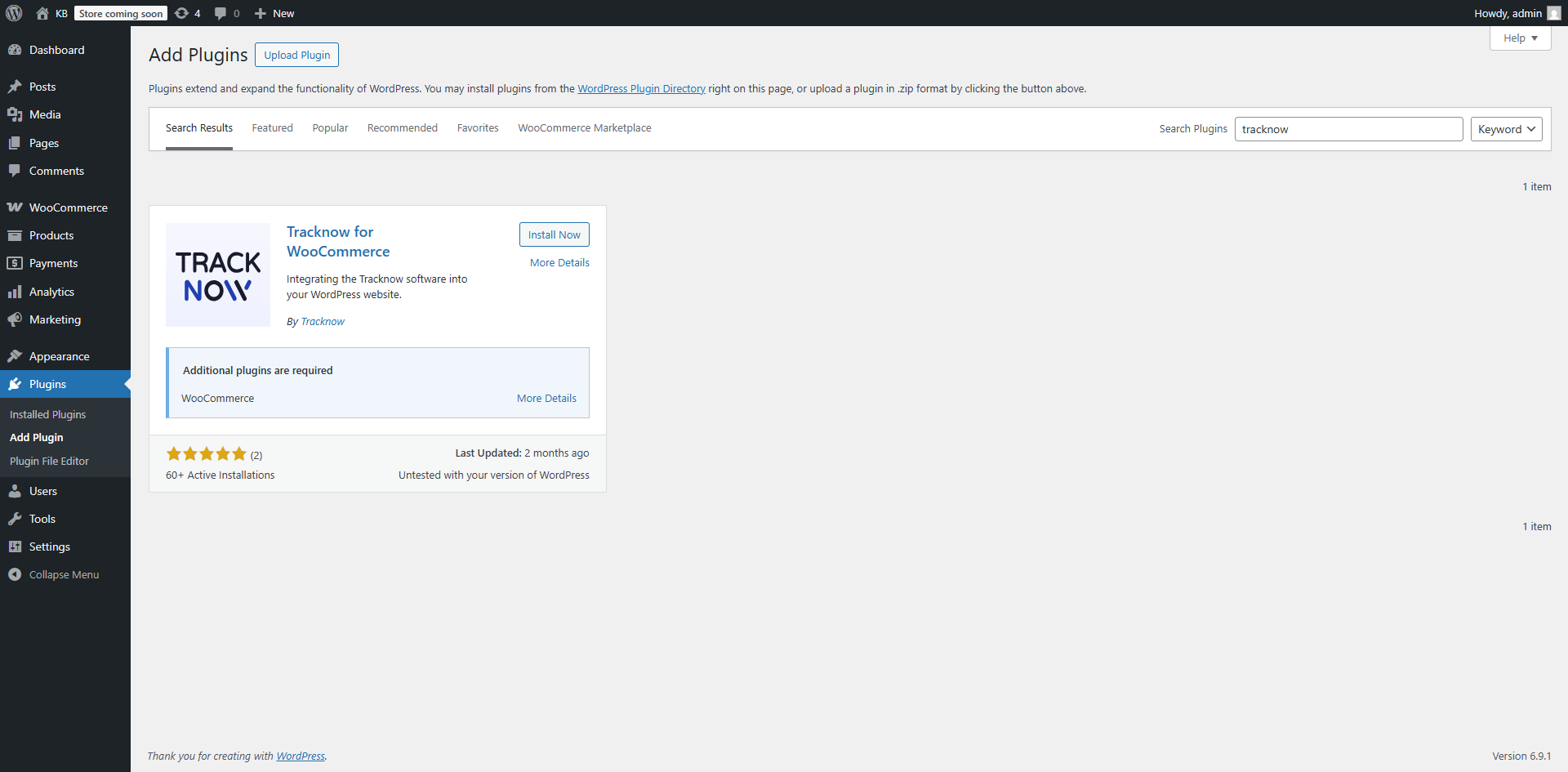
Login to the WordPress admin dashboard → Plugins → Add Plugin → Search for the Tracknow for WooCommerce plugin → Install the plugin and activate it
Navigate to WooCommerce → Settings → Tracknow tab → Fill out the plugin configuration → Save Changes
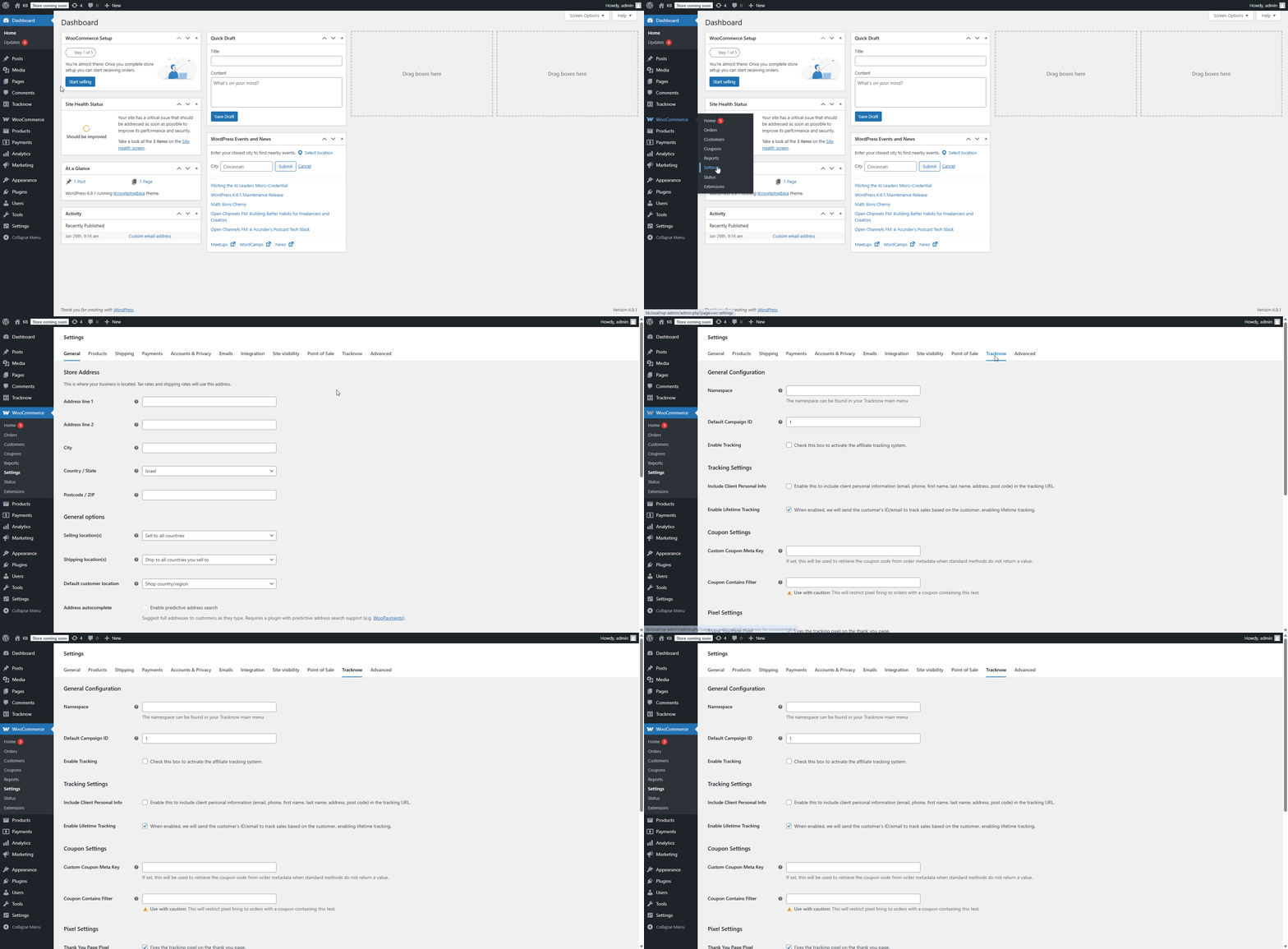
| Field | Description |
|---|---|
| Namespace (Mandatory) | Enter the Tracknow namespace to which data should be sent. This value is available in the Tracknow dashboard main menu |
| Default Campaign (Mandatory) | Enter the Tracknow Camapign ID to which data should be sent |
| Enable Tracking (Mandatory) | Check this checkbox to enable sending data (activates plugin data transfer) |
| Include Client Personal Info (Optional) | Check this checkbox in order to see client details for each conversion on Tracknow (First name, Last name, Email, Address) |
| Enable Lifetime Tracking (Mandatory if using lifetime) | Check this checkbox if your affiliate program associates a client with his referring affiliate for lifetime |
| Custom Coupon Meta Key (Mandatory if custom coupon field is used) | Specify the custom meta key you use to store coupon codes if it differs from the default WooCommerce order coupon field |
| Coupon Contains Filter (Optional) | Provide a string value to restrict data transmission to purchases that either include our unique affiliate identifier or use a coupon code containing that specified string |
| Thank You Page Pixel (Optional) | A fallback option that fires postbacks when client reaches the thank you page. Leave off by default |
| API Key (Optional) | Enter the Tracknow API key you generated to enable automatic syncing of conversion statuses from WooCommerce to Tracknow |
| Auto Approve on Completed (Optional) | Enable this checkbox to automatically approve conversions in Tracknow when the corresponding WooCommerce order reaches the “Completed” status |
| Auto Decline on Cancelled (Optional) | Enable this checkbox to automatically reject conversions in Tracknow when the corresponding WooCommerce order reaches the “Cancelled” status |
| Enable Debug Logs (Optional) | For Tracknow team troubleshooting only. Leave this option disabled unless instructed by our support team |
Postback Integration
Login to the WordPress admin dashboard → Appearance → Theme File Editor → Locate your current theme's functions.php file
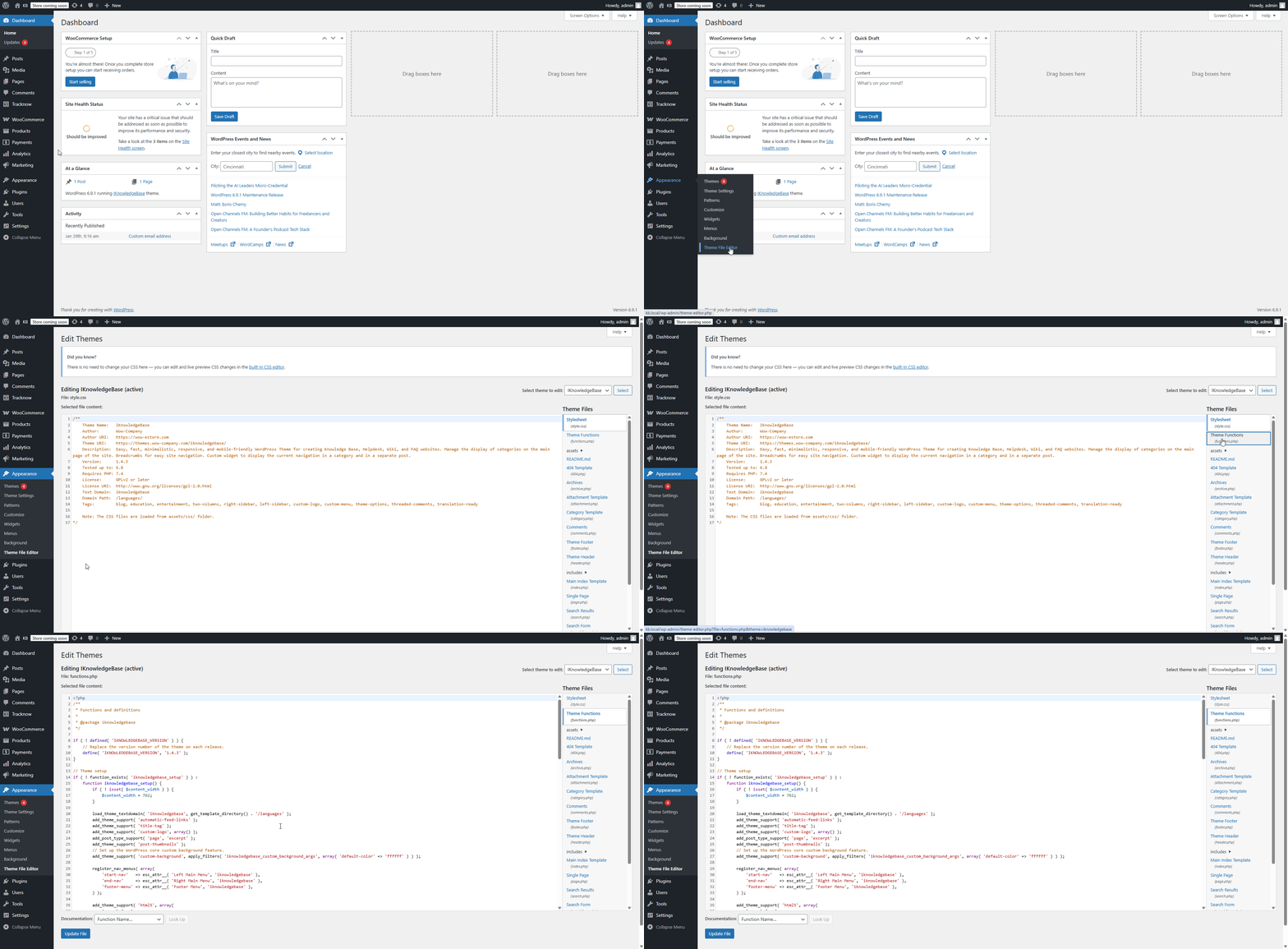
Add the following code inside the functions.php file:
function add_custom_script_to_head() {
    ?>
    <script>
        // Get a query parameter by name from the URL
        function getQueryParam(name) {
            const urlParams = new URLSearchParams(window.location.search);
            return urlParams.get(name);
        }

        // Set a cookie for the root domain, available across subdomains
        function setCookie(name, value, days) {
            const maxAge = days * 24 * 60 * 60; // Convert days to seconds
            const domain = "." + window.location.hostname
                .split('.')
                .slice(-2)
                .join('.'); // example.com

            document.cookie = `${name}=${encodeURIComponent(value)}; path=/; domain=${domain}; max-age=${maxAge}; secure;`;
        }

        // Main: look for click_id and store it
        (function () {
            const clickId = getQueryParam("click_id");

            if (clickId) {
                setCookie("click_id", clickId, 365); // Store for 1 year
            }
        })();
    </script>
    <?php
}

add_action('wp_head', 'add_custom_script_to_head');
This script captures our unique identifier (click_id) from the URL query parameters and stores it in a browser cookie for later use.
It is added to your website’s header to ensure it loads and runs across all pages.
If your website includes pages that are not powered by WordPress, you will need to manually add this script to those pages as well to ensure consistent tracking.
Next, add the following code to your theme’s functions.php file:
function tracknow_tracking( $order_id ) {
    // Ensure the order exists
    $order = wc_get_order( $order_id );
    if ( ! $order ) {
        return;
    }

    // Retrieve the `click_id` from cookies if it exists
    $click_id = isset($_COOKIE['click_id']) ? $_COOKIE['click_id'] : null;

    // Get order details
    $order_total    = $order->get_total();
    $order_shipping = $order->get_shipping_total();
    $coupons        = $order->get_used_coupons();
    $coupon_code    = ! empty( $coupons ) ? $coupons[0] : '';

    // Common query parameters
    $query_args = [
        'order_id' => $order_id,
        'amount'   => $order_total - $order_shipping,
        'coupon'   => $coupon_code,
    ];

    // Add tracking ID
    if ( $click_id ) {
        $query_args['click_id'] = $click_id;
    } else {
        $query_args['campaign_id'] = {CAMPAIGN ID}; // Replace with actual campaign ID if needed
    }

    // Determine if we're on the thank you page
    if ( is_wc_endpoint_url( 'order-received' ) ) {
        // Use success.jpg (pixel tracking)
        $tracking_url = add_query_arg( $query_args, 'https://{NAMESPACE}-tracking.tracknow.info/success.jpg' );
        echo '<img src="' . esc_url( $tracking_url ) . '" width="1" height="1" style="display:none;" alt="" />';
    } else {
        // Use postback endpoint (server-side GET)
        $postback_url = add_query_arg( $query_args, 'https://{NAMESPACE}-tracking.tracknow.info/postback' );
        wp_remote_get( $postback_url );
    }
}

// Hook into WooCommerce order completion to trigger the tracking
add_action( 'woocommerce_thankyou', 'tracknow_tracking', 40 );
add_action( 'woocommerce_order_status_processing', 'tracknow_tracking', 45 );
add_action( 'woocommerce_pre_payment_complete', 'tracknow_tracking', 50 );
add_action( 'woocommerce_payment_complete', 'tracknow_tracking', 55 );
This code is responsible for gathering the order data, generating the postback URL and firing it to your Tracknow dashboard when the order is complete.
Replace the {NAMESPACE} placeholder with your actual Tracknow namespace before pasting this code Replace the {CAMPAIGN ID} placeholder with your actual Tracknow campaign ID before pasting this code